
ChillDesk lives in the menu bar (Mac) or the tray (Windows). Click its icon for quick controls. Nothing is required: the defaults are meant to be good.
The icon menu
The menu is on both Mac and Windows and holds what you reach for most:
- Scene, to switch the scene.
- Snow amount: Off, Light, Normal or Heavy. Light is the default.
- New Year tree, with Lights on and the light patterns.
- Call the snow plow.
- Settings…
- Check for updates.
- Quit ChillDesk.
The Settings window
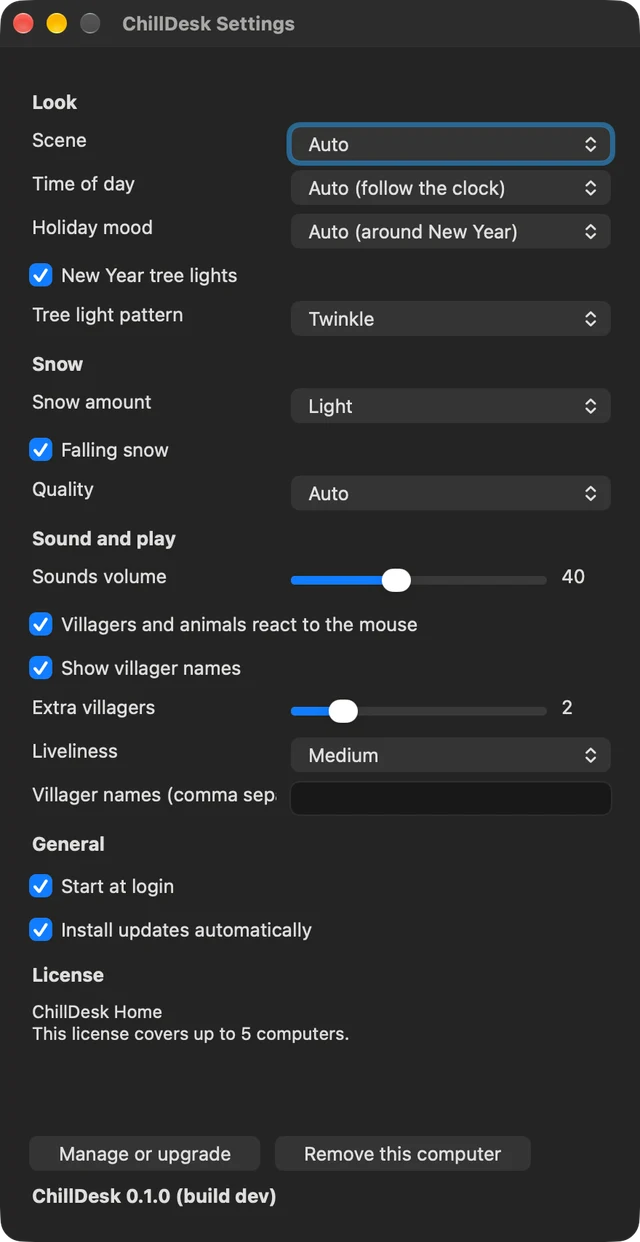
Settings… opens a window with five sections, on a Mac from the menu-bar icon and on Windows from the tray icon. The picture below is the Mac window; the Windows one has the same sections and fields.
Look
Scene (Auto, Winter, Christmas or Santa) and Time of day: Auto follows your clock, or you can pin the scene to Night, Dawn, Morning, Noon, Afternoon, Sunset, Dusk or Evening. Around the holidays there is also Holiday mood (Auto around New Year, Always or Off) and the tree’s lights and light pattern (Twinkle, Steady, Chase or Breathe). See Christmas mode and the sky that follows your clock.
Snow
Snow amount, a Falling snow switch for the flakes in the air, and Quality: Auto, High or Saver. More in Snow that settles on your open windows.
Sound and play
- Sounds volume, from silent to loud (the sounds are synthesized by the program).
- Villagers and animals react to the mouse.
- Show villager names.
- Extra villagers, from 0 to 12.
- Liveliness: Low, Medium or High.
- Names, comma separated, your own names for the villagers.
See Name your villagers.
General
Start at login and Install updates automatically, both on by default. The bottom of the window shows the version you run.
License
Your license state, with Activate, Buy ChillDesk, Manage or upgrade and Remove this computer. The steps are in How to activate ChillDesk.
If it feels heavy
Less snow, fewer extra villagers, lower Liveliness and Quality set to Saver all cost less. Most people never need to change them. Details in Does an animated desktop slow your computer down?.